ESP32 Family Reference: Boards, Benchmarks, Use Cases, and Pitfalls
Reference date: 2026-10-01
Audience: makers, embedded developers, and teams selecting hardware for connected products.
Coverage: original ESP32, S2, S3, C2/ESP8684, C3, C5, C6, C61, H2, and P4.
The shortest useful answer: choose C3 for straightforward, inexpensive Wi-Fi/BLE projects; S3 with PSRAM for USB devices, graphics, audio processing, and small vision models; C6 for Wi-Fi plus Thread/Zigbee; C61 with PSRAM for memory-hungry Wi-Fi 6/BLE applications that do not need Thread; C5 when 5 GHz Wi-Fi is a requirement; H2 for Thread/Zigbee devices without Wi-Fi; and P4 for substantially more demanding multimedia, usually with a companion wireless chip.
This is a selection reference, not a substitute for a board schematic or the exact chip/module datasheet. Benchmarks below are published results, not measurements performed for this document. Newer families and silicon revisions may have different availability and software support.
Contents
- 1. Chip, module, and board are different things
- 2. Quick selection guide
- 3. Hardware comparison
- 4. Family profiles and use cases
- 5. Benchmarks and performance interpretation
- 6. Development-board buying guide
- 7. Software and portability
- 8. Memory, power, and radio architecture
- 9. Bad practices and better alternatives
- 10. Practical tips and troubleshooting
- 11. Pre-purchase and production checklists
- 12. Sources and maintenance
Diagrams are rendered from Mermaid at build time. The adjacent tables and descriptions contain the same selection information.
1. Chip, module, and board are different things
People often say “ESP32 board” when they mean an ESP32 chip family. That ambiguity causes purchasing mistakes.
| Layer | Example | What it determines |
|---|---|---|
| SoC / chip | ESP32-S3, ESP32-C6 | CPU architecture, radio hardware, peripheral controllers, internal memory |
| Module | ESP32-S3-WROOM-1-N8R8 | Chip, flash/PSRAM configuration, antenna implementation, module pinout |
| Development board | ESP32-S3-DevKitC-1-N8R8 | Power circuit, USB routing, exposed pins, buttons, LEDs, connectors |
| Application board | A camera board, display kit, or battery sensor board | Attached peripherals, occupied pins, actual sleep current, enclosure constraints |

Naming rules worth knowing:
- S3, C6, and C61 are not interchangeable revisions of one pin-compatible chip.
- WROOM does not universally mean “no PSRAM.” Some S3 and C61 WROOM configurations include PSRAM.
- WROVER is strongly associated with PSRAM-equipped original ESP32 modules, but do not apply that naming rule to every family.
- On an ESP32-S3-WROOM-1-N8R8, the module documentation identifies 8 MB flash and 8 MB PSRAM. Suffix conventions are product-specific; read the ordering table.
- A USB-C connector describes a connector, not a USB peripheral capability.
- A module with radio certifications can simplify compliance, but it does not automatically certify the complete finished product.
Source: Espressif board-selection guide, Arduino board guide, and S3 DevKit ordering information.
2. Quick selection guide
Start with the requirement that cannot be added in software
| Hard requirement | First candidates | Important qualification |
|---|---|---|
| Low-cost Wi-Fi sensor, switch, or MQTT controller | C3; C2 for tightly cost-optimized products | C2 has less memory and a more involved Arduino setup |
| General-purpose Wi-Fi/BLE plus native USB HID or custom USB device | S3 | Buy a board with native USB wired out |
| Wi-Fi plus capacitive touch, audio DSP, or a DVP camera | S3 with PSRAM | Peripheral compatibility and buffer size still matter |
| Thread or Zigbee plus Wi-Fi on the same SoC | C6, C5 | Hardware capability does not guarantee all protocol combinations are supported concurrently |
| Wi-Fi 6 plus PSRAM, without Thread/Zigbee | C61, C5 | C61 has no 802.15.4 radio |
| 5 GHz Wi-Fi | C5 | S3, C6, and C61 are 2.4 GHz-only |
| Thread/Zigbee sensor without Wi-Fi | H2 | Needs the appropriate network infrastructure |
| Bluetooth Classic SPP or A2DP | Original ESP32, among the main families covered here | BLE is not a substitute for Bluetooth Classic |
| Wi-Fi USB device with no Bluetooth requirement | S2 or S3 | S2 is single-core and has no Bluetooth |
| MIPI display/camera, high-speed USB, or heavier multimedia | P4 | No integrated Wi-Fi/Bluetooth; plan connectivity separately |
| Precise analog measurements | Any suitable MCU plus an external ADC | Nominal ADC bit depth alone is not a precision guarantee |
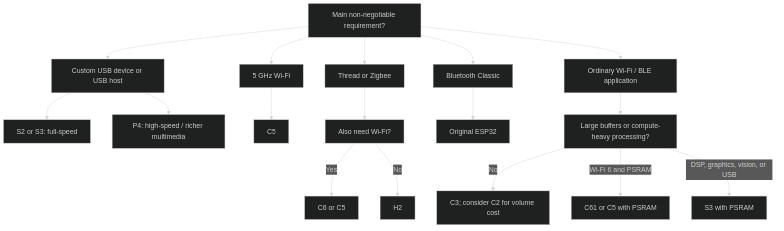
This diagram gives starting points, not mutually exclusive categories. A project needing several capabilities must satisfy all of them.
S3 vs C6 vs C61 vs C5
| Question | S3 | C6 | C61 | C5 |
|---|---|---|---|---|
| Two main application cores? | Yes | No | No | No |
| Wi-Fi generation | Wi-Fi 4 | Wi-Fi 6 | Wi-Fi 6 | Wi-Fi 6 |
| 5 GHz Wi-Fi? | No | No | No | Yes |
| Integrated Thread/Zigbee radio? | No | Yes | No | Yes |
| Memory-mapped PSRAM support? | Yes | No | Yes | Yes |
| Programmable USB OTG? | Yes, full-speed | No | No | No |
| Main selection advantage | Compute, DSP, USB, graphics | Wi-Fi + mesh, LP core | Wi-Fi 6 + expandable RAM | Dual-band Wi-Fi + mesh + expandable RAM |
C61 is not “C6 with more features.” It trades the C6’s 802.15.4 radio and separately programmable LP CPU for a different Wi-Fi/BLE-oriented design with PSRAM support.
3. Hardware comparison
3.1 CPU and memory
Values are silicon capabilities, not the free heap or the memory fitted to every board. “Main SRAM” follows the vendor’s headline memory figure; cache reservations and other dedicated regions can reduce usable application memory.
| Family | Main application CPU | Maximum main clock | Secondary low-power execution | Main internal SRAM | Memory-mapped PSRAM |
|---|---|---|---|---|---|
| ESP32 | Usually 2-core Xtensa LX6; single-core variants exist | 240 MHz | ULP FSM coprocessor | 520 KB | Yes, selected modules/designs |
| S2 | 1-core Xtensa LX7 | 240 MHz | ULP RISC-V / FSM | 320 KB | Yes |
| S3 | 2-core Xtensa LX7 | 240 MHz | ULP RISC-V / FSM | 512 KB | Yes |
| C2 / ESP8684 | 1-core RISC-V | 120 MHz | No separate programmable LP CPU | 272 KB | No |
| C3 | 1-core RISC-V | 160 MHz | No separate programmable LP CPU | 400 KB | No |
| C5 | 1-core HP RISC-V | 240 MHz | LP RISC-V, up to 48 MHz in datasheet v1.5 | 384 KB, plus 16 KB LP SRAM | Yes, variant-dependent |
| C6 | 1-core HP RISC-V | 160 MHz | LP RISC-V, up to 20 MHz | 512 KB, plus 16 KB LP SRAM | No |
| C61 | 1-core RISC-V | 160 MHz | No separate programmable LP CPU | 320 KB | Yes, variant-dependent |
| H2 | 1-core RISC-V | 96 MHz | No separate programmable LP CPU | 320 KB, plus 4 KB LP memory | No |
| P4 | 2-core HP RISC-V | Up to 400 MHz; check silicon revision | LP RISC-V, up to 40 MHz | 768 KB HP L2 memory, plus dedicated LP/SPM regions | Yes; package-dependent |
Interpretation:
- An LP/ULP coprocessor is not another interchangeable FreeRTOS application core.
- C2/C3 memory figures include cache reservations. Do not treat the entire headline number as available heap.
- PSRAM is larger but has different access latency, cache behavior, and allocation/peripheral restrictions from internal SRAM.
- C6 can access ordinary SPI peripherals, including suitable RAM devices managed explicitly by software, but that is not equivalent to supported memory-mapped PSRAM.
- The C5 datasheet v1.5 lists an LP CPU maximum of 48 MHz; Espressif’s overview table lists 40 MHz. For a design, resolve this against the exact silicon revision and SDK clock configuration rather than relying on the overview.
3.2 Radios and native USB
| Family | Wi-Fi | Bluetooth | IEEE 802.15.4 | Native USB hardware |
|---|---|---|---|---|
| ESP32 | 2.4 GHz, 802.11b/g/n | Classic BR/EDR + BLE | No | None |
| S2 | 2.4 GHz, 802.11b/g/n | None | No | Full-speed OTG |
| S3 | 2.4 GHz, 802.11b/g/n | BLE | No | Full-speed OTG + Serial/JTAG |
| C2 | 2.4 GHz, 802.11b/g/n | BLE | No | None |
| C3 | 2.4 GHz, 802.11b/g/n | BLE | No | Fixed-function Serial/JTAG |
| C5 | 2.4 and 5 GHz, Wi-Fi 6 / 802.11ax, with legacy modes | BLE | Yes: Thread/Zigbee | Fixed-function Serial/JTAG |
| C6 | 2.4 GHz, Wi-Fi 6 / 802.11ax, with legacy modes | BLE | Yes: Thread/Zigbee | Fixed-function Serial/JTAG |
| C61 | 2.4 GHz, Wi-Fi 6 / 802.11ax, with legacy modes | BLE | No | Fixed-function Serial/JTAG |
| H2 | None | BLE | Yes: Thread/Zigbee | Fixed-function Serial/JTAG |
| P4 | None | None | No | High-speed OTG, full-speed OTG, and Serial/JTAG |
Bluetooth version labels and certifications change as controllers/stacks evolve. Check support for the specific feature you need: coded PHY, advertising extensions, direction finding, LE Audio, or a particular profile. “Bluetooth 5/6” is not a promise that every optional feature is implemented.
USB terms:
- USB-to-UART bridge: an external chip such as CP210x or CH340; the MCU itself may have no USB controller.
- USB Serial/JTAG: a fixed-function controller for programming, console, and debugging. It does not turn a C3/C6/C61/H2 into an arbitrary USB keyboard, mass-storage device, or audio device.
- USB OTG: a programmable USB controller suitable for supported host/device classes, subject to stack and board support.
- Full-speed: 12 Mbit/s signaling. High-speed: 480 Mbit/s signaling. Neither is guaranteed useful application throughput.
- S3’s native OTG and Serial/JTAG normally share its internal USB PHY. Simultaneous use requires checking PHY ownership and, where applicable, an external PHY design.
3.3 Peripheral differences that frequently block a design
| Capability | Practical selection rule |
|---|---|
| Capacitive touch | Present on original ESP32, S2, S3, and P4; not a standard feature of the C/H families covered here |
| On-chip analog DAC | Original ESP32 and S2 have two 8-bit DACs; S3 and the other covered families do not |
| Audio output on S3/C-series | Use an I2S DAC/codec/amplifier, or suitable PWM-based output; an I2S controller is not an analog DAC |
| Ethernet MAC | Original ESP32 and P4; normally requires an external PHY and board-level wiring |
| Ethernet on other families | External SPI Ethernet controllers are an option; account for bus and driver limits |
| CAN / TWAI | Family-specific: C5 includes CAN FD controllers; many others offer Classical CAN/TWAI, while C2/C61 do not offer the same capability |
| Physical CAN connection | A CAN/TWAI controller still needs an appropriate transceiver; GPIOs cannot be connected directly to CANH/CANL |
| MIPI CSI/DSI | P4 among the main families covered here |
| Parallel camera / LCD | S3 is a strong candidate; S2 and original ESP32 have different interfaces and resource-sharing constraints |
| GPIO count | Chip count is not usable board-pin count; subtract flash/PSRAM, straps, native USB, and onboard peripherals |
Sources: family datasheets linked in Section 3.1. Peripheral counts, pin mappings, and errata must be checked against the exact part.
4. Family profiles and use cases
4.1 ESP32-S3: compute, DSP, graphics, and programmable USB
Choose it for: USB HID/MIDI or other supported USB classes, LVGL displays, microphone processing, voice interfaces, DVP cameras, and small quantized vision models.
Its two application cores, single-precision FPU, vector instructions, native USB OTG, and PSRAM ecosystem make it a strong default for feature-rich maker projects.
Good starting configuration: an S3 board with a documented 8 MB flash / 8 MB PSRAM variant, such as an N8R8 DevKit configuration. Smaller configurations may be sufficient, but graphics and camera applications benefit from RAM headroom.
Do not choose it assuming: Bluetooth Classic, 5 GHz Wi-Fi, Thread/Zigbee, a built-in DAC, or high-speed USB. It has none of those.
Example: a touchscreen device with microphone input, Wi-Fi provisioning, and USB maintenance. Use queues between acquisition and processing tasks, DMA-capable buffers where required, and PSRAM for larger non-critical buffers.
4.2 ESP32-C6: integrated Wi-Fi and 802.15.4
Choose it for: Matter-over-Thread or Matter-over-Wi-Fi devices, Zigbee experiments, connected controls, and low-power monitoring where the LP CPU can reduce main-core wakeups.
Main advantage: Wi-Fi 6, BLE, and an 802.15.4 radio on one SoC, with more main SRAM than C61 and a separately programmable LP CPU.
Limits: one main application core, no supported memory-mapped PSRAM, no programmable USB OTG, and 2.4 GHz-only Wi-Fi.
Example: a connected environmental sensor whose product variant runs either a Thread stack or a Wi-Fi stack. Validate wake sources, protocol stack memory, and coexistence rather than assuming every radio can be used without contention.
4.3 ESP32-C61: Wi-Fi 6/BLE with expandable RAM
Choose it for: Wi-Fi/BLE connectivity adapters, data loggers, POS-style interfaces, and networked applications that need more buffer space than internal SRAM alone allows.
Main advantage: Wi-Fi 6 plus PSRAM support in a single-main-core device.
Important differences from C6: no 802.15.4 radio, no separately programmable LP CPU, and only 320 KB headline main SRAM. Adding PSRAM does not replace all internal-memory requirements.
The official ESP32-C61-DevKitC-1 documentation describes an ESP32-C61-WROOM-1 configuration with up to 8 MB flash and 2 MB PSRAM. Other C61 silicon configurations exist; PSRAM is not guaranteed merely by the C61 name.
Do not choose it for: a standalone Thread/Zigbee endpoint or an arbitrary USB HID device.
Example: a Wi-Fi sensor hub that batches measurements in PSRAM and exposes a BLE provisioning interface.
4.4 ESP32-C5: dual-band Wi-Fi and a broader connectivity mix
Choose it for: products that must use 5 GHz Wi-Fi, connectivity adapters, gateways, or designs combining Wi-Fi, BLE, and 802.15.4.
Main advantage: 2.4/5 GHz Wi-Fi 6, a 240 MHz main CPU, PSRAM-capable variants, and CAN FD controllers.
Limits: still one main application core, no programmable USB OTG, and more revision-dependent details than older families. Its datasheet explicitly identifies revision restrictions for some peripherals.
Do not assume: simultaneous independent operation on both Wi-Fi bands or router-class Wi-Fi throughput. Dual-band capability is not the same as dual concurrent radios.
Example: a mains-powered control gateway on a 5 GHz network, with an external CAN transceiver and an SDK-supported mesh configuration.
4.5 Other useful families
| Family | Good fit | Main reason to look elsewhere |
|---|---|---|
| Original ESP32 | Existing projects, Classic Bluetooth SPP/A2DP, Ethernet-MAC designs, basic camera boards | No native USB; older peripheral architecture; exact part longevity matters |
| S2 | Wi-Fi-enabled USB devices, capacitive-touch interfaces, designs using its DACs | No Bluetooth and one main core; S3 is often more flexible |
| C3 | Small Wi-Fi/BLE sensors, lighting, relays, simple web/MQTT applications | No PSRAM, Thread/Zigbee, or programmable USB OTG |
| C2 / ESP8684 | Cost- and footprint-sensitive connected products with modest firmware | Tighter RAM/peripheral budget and less convenient Arduino packaging |
| H2 | Thread/Zigbee endpoints, BLE devices, dedicated 802.15.4 radio coprocessors | No Wi-Fi; not a drop-in replacement for a Wi-Fi board |
| P4 | Large HMIs, MIPI camera/display pipelines, video encoding, high-speed USB | No integrated wireless; larger system, firmware, and power budget |
Battery-device qualification: H2 or C6 is not automatically the “lowest-power board.” Sleep current, wake frequency, protocol role, sensor power, and board electronics determine the result. A Thread router is normally continuously available; a sleepy end device has different requirements.
5. Benchmarks and performance interpretation
5.1 Published CoreMark results
CoreMark measures a small CPU workload. It does not measure Wi-Fi throughput, display refresh, ADC quality, or full application performance.
These are datasheet-reported figures, with the explicitly separate ESP-IDF example below. They are not a controlled cross-family experiment: most datasheet summaries do not disclose a complete toolchain, memory placement, or runtime configuration.
| Family | Benchmark clock | Application cores participating | Published CoreMark | Published CoreMark/MHz | Source version |
|---|---|---|---|---|---|
| ESP32 | 240 MHz | 1 | 539.98 | 2.25 | Datasheet v5.3 |
| ESP32 | 240 MHz | 2 | 1,079.96 | 4.50 | Datasheet v5.3 |
| S2 | 240 MHz | 1 | 542.80 | 2.26 | Datasheet v1.9 |
| S3 | 240 MHz | 2 | 1,329.92 | 5.54 | Datasheet v2.2 |
| C2 / ESP8684 | 120 MHz | 1 | 369.58 | 3.08 | Datasheet v2.3 |
| C3 | 160 MHz | 1 | 483.27 | 3.02 | Datasheet v2.4 |
| C5 | 240 MHz | 1 HP | 820.19 | 3.42 | Datasheet v1.5; O3 stated |
| C6 | 160 MHz | 1 HP | 496.66 | 3.10 | Datasheet v1.5 |
| C61 | 160 MHz | 1 | 553.78 | 3.46 | Datasheet v1.1; O3 stated |
| H2 | 96 MHz | 1 | 303.38 | 3.16 | Datasheet v1.3 |
| P4 | Not stated in the score summary | 2 HP | Absolute score not stated | 6.92 | Preliminary datasheet v0.7 |
Do not directly compare a two-core score with a one-core score as though both describe a single task. CoreMark/MHz in a dual-core result is also an aggregate figure, not per-core efficiency.
The P4 value is intentionally not multiplied by its maximum clock to manufacture an absolute benchmark result. Its current linked datasheet is preliminary, and the summary does not provide a complete benchmark configuration.
Why different websites give different C3 numbers
Espressif’s CoreMark component example reports 409.249028 at 160 MHz, using GCC 12.2.0, CoreMark code in IRAM, and -O3 -fjump-tables -ftree-switch-conversion.
That is different from the C3 datasheet’s 483.27. Both are published figures from different measurement contexts. The difference is a warning against silently combining benchmark tables from different versions and setups.
5.2 DSP: the instruction set and optimized library matter
Selected ESP-DSP benchmark results, using the published O2 optimized implementation columns. Values are CPU cycles, so lower is better. They are not timings at a common clock.
| Operation | ESP32 cycles | S3 cycles | P4 cycles |
|---|---|---|---|
| Float dot product, 256 points | 1,047 | 432 | 1,319 |
| Signed 16-bit dot product, 256 points | 437 | 307 | 208 |
| Float FIR, 1,024 samples, 256 coefficients | 1,078,691 | 443,671 | 1,606,563 |
| Float radix-2 FFT, 1,024 complex points | 113,205 | 97,847 | 126,053 |
| Signed 16-bit radix-2 FFT, 1,024 complex points | 226,154 | 15,623 | 17,523 |
What this tells you: S3’s optimized vector paths can make a large difference for particular DSP workloads. P4’s higher clock and newer architecture do not make it the fewest-cycle winner for every function.
What it does not tell you: end-to-end audio latency, total energy, or performance of an unoptimized Arduino library. Memory placement, cache configuration, compiler version, and the actual algorithm still need measurement.
5.3 Neural-network inference: published S3 vs P4 examples
Selected ESP-NN model benchmarks from a pinned README revision. These measure model invoke() time, not image capture, preprocessing, drawing, networking, or total camera-to-result latency.
| INT8 model | Chip / clock | Without ESP-NN | With ESP-NN | With ESP-NN, dual-core enabled |
|---|---|---|---|---|
| MobileNetV3 Small, 224 by 224 RGB, 1,000 classes | S3 / 240 MHz | 26,679 ms | 729 ms | 690 ms |
| MobileNetV3 Small, 224 by 224 RGB, 1,000 classes | P4 / 400 MHz | 10,980 ms | 388 ms | 253 ms |
| YOLO11n, 192 by 192 RGB, 80 classes | S3 / 240 MHz | 130,753 ms | 1,253 ms | 1,053 ms |
| YOLO11n, 192 by 192 RGB, 80 classes | P4 / 400 MHz | 52,240 ms | 620 ms | 417 ms |
Published conditions include a PSRAM tensor arena; P4 uses 200 MHz HEX PSRAM, while S3 uses 80 MHz octal PSRAM and a 64 KB data cache. Dual-core results explicitly enable the library’s dual-core kernel processing.
Practical conclusion: choose the model, tensor format, optimized kernels, and memory configuration together. The application may spend more time moving pixels than running the model.

5.4 Wireless benchmarks: distinguish PHY rate from useful throughput
| Metric | What it actually means |
|---|---|
| Wi-Fi advertised PHY rate | Radio signaling rate under a particular modulation/channel mode |
TCP/UDP iperf throughput | Network payload performance under a specified test setup |
| MQTT publish latency | Includes scheduling, transport, broker behavior, and possibly TLS/connection setup |
| BLE PHY rate | Not the same as application throughput; connection interval and packet negotiation matter |
| 802.15.4 rate | These radios use a 250 kbit/s PHY in 2.4 GHz; protocol overhead reduces usable payload |
| Wi-Fi 6 | Features can improve operation in dense networks and power management; not an automatic speed multiplier |
No cross-family TCP throughput ranking is invented here. A useful comparison needs the same AP, wired server, firmware settings, band/channel width, RSSI, power-saving mode, and coexistence workload. Test C5’s 2.4 and 5 GHz operation separately.
5.5 Deep-sleep figures are a baseline, not board benchmarks
Selected headline chip deep-sleep figures from the linked datasheets:
| Chip | Published deep-sleep figure |
|---|---|
| Original ESP32 | 10 microamps |
| S3 | 7 microamps |
| C2 / ESP8684 | 5 microamps |
| C3 | 5 microamps |
| C6 | 7 microamps |
| C61 | 10 microamps |
| H2 | 7 microamps |
These are not a controlled ranking of battery life. Retention settings, temperature, flash/PSRAM configuration, LP execution, and wake circuitry affect the applicable conditions. An LED, USB bridge, regulator, sensor, or voltage-divider path may dominate complete-board sleep current.
5.6 A reproducible benchmark procedure
Use Espressif’s CoreMark example after installing an ESP-IDF release supporting your target:
idf.py create-project-from-example "espressif/coremark:coremark_example"
cd coremark_example
idf.py set-target esp32c6
idf.py menuconfig
idf.py build
idf.py -p /dev/ttyACM0 flash monitor
Replace the target and port with your actual chip and interface. Examples include esp32, esp32s3, esp32c3, esp32c5, esp32c6, esp32c61, esp32h2, and esp32p4.
For a comparison worth keeping:
- Record the full board/module SKU, silicon revision, flash, PSRAM, and antenna.
- Pin ESP-IDF, the benchmark component, compiler, and project configuration. Keep the dependency lockfile.
- Confirm CPU clock, optimization flags, code/data placement, PSRAM mode, and cache configuration.
- Match participating application cores. Do not count an LP/ULP CPU as another benchmark worker.
- Separate “radios off” CPU measurements from realistic “radios and application active” measurements.
- Preserve full output, including validation checks. Repeat runs and report variation, not only the best score.
- Measure the actual workload too: latency, peak RAM, sustained throughput, dropped samples, and energy per useful operation.
| Test | Recommended output |
|---|---|
| CPU benchmark | Validated score, clock, participating cores, compiler/flags, memory placement |
| Wi-Fi test | TCP and UDP results in both directions; RSSI, band, channel width, AP, packet size, duration |
| Graphics test | Resolution, pixel format, bus, buffering, frame time, dropped/partial frames |
| Audio/vision test | Sample/frame settings, model/library version, processing latency, overrun count |
| Power test | Complete-device sleep current, active trace, wake-to-result time, energy per cycle |
| Stability test | Duration, reconnect count, minimum heap, largest free block, reset/panic count |
6. Development-board buying guide
6.1 Useful starting points
These are reference examples, not claims that every retailer has the same revision or stock.
| Family | Board/module starting point | Why it is useful | What to verify |
|---|---|---|---|
| Original ESP32 | ESP32-DevKitC or a documented WROOM/WROVER board | Mature examples; Classic Bluetooth | Exact module, PSRAM, USB bridge, board width |
| S2 | ESP32-S2-Saola-1 or a documented S2 USB board | Wi-Fi plus native USB | Native USB routing and flash/PSRAM |
| S3 | ESP32-S3-DevKitC-1, preferably a PSRAM SKU | Broad prototyping and USB/DSP work | N8R8 vs another memory configuration; correct USB connector |
| C3 | ESP32-C3-DevKitM-1 or a documented compact C3 board | Straightforward Wi-Fi/BLE development | Antenna design, regulator, native USB exposure |
| C6 | ESP32-C6-DevKitC-1 or DevKitM-1 | Wi-Fi/Thread/Zigbee exploration | Chip package, available pins, current-measurement path |
| C61 | ESP32-C61-DevKitC-1 | Official PSRAM-equipped reference configuration | Exact flash/PSRAM and SDK/toolchain support |
| C5 | ESP32-C5-DevKitC-1 | Dual-band Wi-Fi and mesh capabilities | Board/silicon revision, antenna, memory variant |
| H2 | ESP32-H2-DevKitM-1 | Thread/Zigbee or RCP work | Network infrastructure and absence of Wi-Fi |
| P4 | ESP32-P4-Function-EV-Board | Display, camera, Ethernet, and multimedia reference | Included accessories, P4 revision, companion wireless firmware |
The documented P4 Function EV Board includes an ESP32-C6 companion module for Wi-Fi/BLE. That is a board-level feature, not wireless hardware inside P4.
6.2 Do not buy by the thumbnail alone
“DevKit V1,” “SuperMini,” “ESP32 camera,” and similar marketplace names are not reliable hardware specifications. Different sellers can use different modules, regulators, antennas, LEDs, and pin assignments under nearly identical names.
Before buying, obtain:
- A readable module marking and exact SKU, not just “ESP32.”
- The schematic and pinout for the actual board revision.
- Confirmed flash and PSRAM, including the memory bus mode where relevant.
- An explanation of each USB connector: power only, UART bridge, native Serial/JTAG, or OTG.
- Sleep-current measurements and regulator information if battery life matters.
- Antenna type and placement requirements, plus whether an external antenna is included.
- Battery charging/protection information; a connector does not prove either exists.
Price guidance: compare total system cost, not only the bare board price. A cheaper chip may need an external USB controller, more glue logic, another radio, or additional development work. Prices vary too much by supplier, region, and volume to treat a static dollar table as a dependable reference.
7. Software and portability
7.1 Framework selection
| Environment | Best use | Main caution |
|---|---|---|
| ESP-IDF | Production firmware, power management, advanced drivers, newest targets | Select a release that supports the exact chip and silicon revision |
| Arduino-ESP32 | Fast prototypes and Arduino-library reuse | ”ESP32-compatible” libraries can still assume original ESP32 registers, cores, or pins |
| Arduino as an ESP-IDF component | Arduino APIs alongside IDF configuration and components | Match the documented Arduino/IDF version compatibility |
| ESPHome | Home-automation devices supported by its current platform/components | Hardware capability does not imply every component or transport is supported |
| MicroPython / CircuitPython | Interactive scripting and rapid sensor experiments | Check the specific firmware build, board definition, drivers, and memory needs |
| Thread/Zigbee/Matter SDKs | Products using those protocol stacks | Check target, transport, stack versions, role, and certification requirements |
The Arduino-ESP32 support table lists stable support for ESP32, S2, S3, C3, C5, C6, H2, and P4. It explicitly notes that C2 and C61 require Arduino as an ESP-IDF component or rebuilding the static libraries. That distinction matters if you expect a normal Boards Manager workflow.
The C61 ESP-IDF getting-started guide has a stable target guide. This does not mean every older ESP-IDF release supports C61.
7.2 Porting traps
| Assumption in existing code | Why it breaks |
|---|---|
| ”ESP32 means Xtensa” | C/H/P families here use RISC-V |
| ”There is always core 1” | Most C/H devices have one main application core |
| ”GPIO 25 is always a DAC” | That is an original ESP32 mapping, not a family-wide rule |
| ”The board LED is on GPIO 2” | Board and revision dependent; it may be an addressable RGB LED |
| ”USB console and UART console are equivalent” | Different drivers, enumeration, sleep behavior, and connector routing |
| ”LEDC/RMT/I2S has the same channel counts and API everywhere” | Hardware resources and framework APIs vary |
| ”A binary built for ESP32 works on ESP32-S3/C6” | Different targets need their own builds |
| ”More PSRAM fixes every allocation failure” | Some allocations must remain internal or have specific capabilities |
Keep board-specific pin definitions and capabilities separate from application logic. Use documented driver APIs instead of hard-coded peripheral registers when portability matters.
8. Memory, power, and radio architecture
8.1 Flash, internal SRAM, and PSRAM are not interchangeable
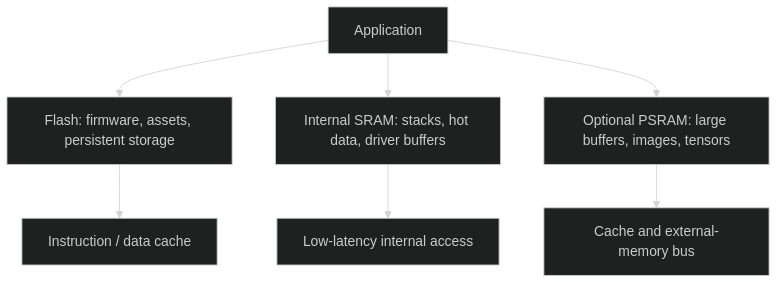
Example: one 800 by 480 RGB565 framebuffer needs 768,000 bytes, about 750 KiB, before GUI objects, stacks, radio buffers, or other allocations. Double buffering needs about 1.46 MiB just for the pixels.
That is why a seemingly powerful chip can still be the wrong choice for a large GUI without PSRAM or a suitable streaming/buffering strategy.
Memory tips:
- Put large, less latency-sensitive buffers in PSRAM when the target and driver support it.
- Preserve internal memory for stacks, hot data, and allocations with specific DMA/driver requirements.
- Do not assume either that every DMA transfer supports PSRAM or that none do. Capabilities vary by chip, peripheral, and driver.
- Track minimum free heap and largest free block, not only total free memory.
- Budget OTA partitions in flash, not RAM. Two firmware slots, rollback metadata, NVS, and assets need a realistic partition table.
- A 4 MB flash board can work well for a simple app, but may be restrictive for larger firmware plus dual-slot OTA and embedded web assets.
8.2 Battery life: optimize the full cycle
For a periodically reporting Wi-Fi device, the expensive phase is often reconnecting and transmitting, not taking the sensor reading.

Practical priorities:
- Measure at the battery or complete-device supply input, not just the SoC rail.
- Remove or gate unnecessary LEDs, sensors, USB bridges, and high-leakage paths.
- Compare energy per completed report, including connection failures and retries.
- Consider batching, reducing report frequency, or a different network protocol.
- Use light sleep/modem sleep when maintaining connectivity is more appropriate than repeated cold reconnects.
- Select wake-capable pins and retention settings for the exact family.
- Use C6/C5 LP execution or S2/S3 ULP features only after verifying what sensors/peripherals can actually run while the main system sleeps.
8.3 Matter, Thread, Zigbee, and BLE are different layers
| Technology | Role |
|---|---|
| IEEE 802.15.4 | Radio/link foundation used by Thread and Zigbee |
| Thread | IPv6 mesh networking over 802.15.4 |
| Zigbee | A different networking/application ecosystem over 802.15.4 |
| Matter | Application interoperability protocol operating over IP transports, including Wi-Fi, Thread, and Ethernet |
| BLE | Often used for commissioning; also supports its own applications and mesh ecosystem |
Consequences:
- S3/C3/C61 can be candidates for Matter over Wi-Fi without having a Thread radio, subject to SDK/resource support.
- H2 can be a Matter-over-Thread endpoint despite having no Wi-Fi.
- Supporting 802.15.4 does not guarantee a firmware can run Zigbee and Thread simultaneously.
- A Thread border router needs a Thread interface, a backbone interface, and border-router software; it is not merely a Thread-capable chip.
- Multiple wireless protocols can contend for shared RF resources. Read the target’s supported coexistence combinations.
8.4 A common Thread border-router architecture
Espressif’s Thread Border Router SDK uses a host processor plus a separate radio coprocessor in its documented reference architecture.

The official border-router board uses S3 + H2. Supported host/RCP combinations and their exact transport wiring are SDK-specific. A P4-based system still needs an appropriate backbone interface, such as Ethernet or a wireless companion.
9. Bad practices and better alternatives
| Bad practice | Likely consequence | Better approach |
|---|---|---|
| Pick a family by its number: “C61 must be better than C6” | Missing a required radio/peripheral | Select by hard requirements and exact datasheet |
| Connect 5 V logic directly to a GPIO | Device damage or unreliable operation | Respect IO voltage limits; use appropriate level shifting |
| Drive relays, motors, or speakers directly from GPIO | Overcurrent, noise, resets, damage | Use suitable drivers, transistors, amplifiers, and protection |
| Power a Wi-Fi board from a marginal USB cable or tiny regulator | Brownouts during radio bursts | Design for transient current and verify the rail at the module |
| Disable the brownout detector to “fix” resets | Corruption and harder-to-debug instability | Fix supply, wiring, decoupling, and load transients |
| Reuse original ESP32 pin assignments on S3/C6 | Boot failures or peripheral conflicts | Use the actual board schematic and target pin documentation |
| Attach strong pull resistors or loads to strapping pins without analysis | Wrong boot mode or memory-voltage configuration | Design the reset-time levels deliberately |
| Use flash/PSRAM pins as general IO | Crashes, boot failure, corrupted transfers | Reserve memory-connected pins |
| Expect original ESP32 GPIO34-39 to drive outputs or supply pull-ups | Non-working inputs/outputs | Respect input-only and pull-resistor restrictions |
| Read classic ESP32 ADC2 while relying on active Wi-Fi | Unavailable/failed conversions | Prefer ADC1 and handle ADC API errors |
| Treat a 12-bit ADC as a precision instrument | Offset, nonlinearity, noise, incorrect voltage | Calibrate, filter, validate input range, or use an external ADC |
| Put the antenna behind metal or against a battery | Poor range and inconsistent throughput | Follow keepout rules and test the final enclosure |
| Assume USB-C or Serial/JTAG means programmable USB HID | Impossible peripheral requirement | Use S2/S3/P4 with the required OTG interface exposed |
| Allocate everything in PSRAM | Latency or driver/DMA incompatibility | Use capability-aware allocation and intentional placement |
| Busy-wait or do long work in interrupts | Watchdog resets, dropped samples, radio starvation | Keep ISRs short; queue work to tasks |
| Write flash/NVS on every sensor sample | Flash wear and unpredictable stalls | Batch, rate-limit, and use appropriate persistence |
| Ignore API return values and reconnect failures | Success-looking logs hiding data loss | Check errors, log actionable context, and use bounded retries |
| Disable TLS certificate checks in production | Connection to an untrusted endpoint | Maintain a valid trust strategy and time handling |
| Hard-code reusable credentials into shared firmware | Fleet-wide exposure if extracted/leaked | Provision device-specific credentials and protect secrets |
| Ship OTA without rollback or interruption testing | Bricked devices after a failed update | Validate images and test power loss, rejection, and rollback |
| Burn security eFuses while experimenting without a recovery plan | Irreversible loss of access | Read the exact target security workflow and stage deployment |
| Use a generic dev board’s chip sleep figure as a battery-life claim | Major runtime shortfall | Measure the complete product across its operating cycle |
Original ESP32-specific pin and ADC warnings are not universal pin rules for every ESP32 family. Each target has its own restrictions and errata.
10. Practical tips and troubleshooting
10.1 Hardware bring-up
Espressif’s original ESP32 hardware-design guide recommends a 3.3 V supply capable of at least 500 mA, appropriate local decoupling, and bulk capacitance at the supply entrance. This is a target-specific starting point, not a complete power specification for every ESP32 board or peripheral combination.
Useful habits:
- Test power during Wi-Fi transmission, not only at idle.
- Separate noisy/high-current loads from the MCU supply path as appropriate; route returns carefully.
- Keep a documented BOOT/RESET recovery method and an accessible programming/debug interface.
- Identify USB data-capable cables before blaming firmware.
- Do not connect external power and USB in an unsupported combination; inspect the board’s power-path schematic.
- For antenna validation, test with the real enclosure, cable routing, display, and battery.
10.2 Pin planning before writing drivers
Make a pin-allocation table that reserves:
| Reservation | Examples of why it matters |
|---|---|
| Boot/strapping signals | External devices may drive them during reset |
| Flash/PSRAM signals | May be unavailable or unsuitable for application IO |
| Native USB | Firmware repurposing can remove the USB console/programming path |
| Onboard RGB LED, display, camera, SD card | Board peripherals already own those pins |
| ADC and wake inputs | Only selected pins support the required function |
| Input-only or special-voltage pins | Not every GPIO has equivalent electrical behavior |
On original ESP32 modules, GPIO6-11 are normally tied to flash, GPIO34-39 are input-only, and WROVER configurations can reserve additional pins for PSRAM. Never transfer that list blindly to another family.
10.3 Firmware performance
- Use the optimized ESP-DSP/ESP-NN path when your workload matches it; confirm it is actually enabled.
- Measure before pinning tasks to cores. Dual-core hardware does not automatically parallelize a single-threaded algorithm.
- Avoid blocking a high-priority task on slow I/O; use queues, timeouts, and backpressure.
- Size buffers from worst-case producer/consumer timing, not only average rates.
- Profile with logging reduced; serial output can dominate short timing measurements.
- Monitor stack high-water marks, minimum heap, fragmentation, and reset reasons.
- For critical interrupt paths, follow the target’s IRAM/cache-safety rules rather than adding
IRAM_ATTRindiscriminately.
10.4 Symptom-to-cause reference
| Symptom | First checks |
|---|---|
| Board disappears from USB | Correct connector; data cable; driver; USB pin reuse; sleep state; wrong USB configuration |
| Upload cannot start | Target selection; BOOT/RESET sequence; serial port; strap levels; UART/native USB routing |
| Brownout or reset during Wi-Fi | Cable drop; regulator capability; decoupling; load transients; boot/reset circuit |
| Analog readings fail with Wi-Fi on original ESP32 | ADC2 ownership; select ADC1; inspect return codes |
| Large allocation fails despite free PSRAM | Requested memory capabilities; largest block; internal heap; PSRAM initialization |
| GUI has tearing or low frame rate | Display bus bandwidth; buffering; transfer completion; rendering cost; memory traffic |
| Camera frames are corrupted | Board pin mapping; sensor support; buffer location; DMA constraints; supply and signal integrity |
| BLE works but Classic serial/audio does not | Does the selected SoC support Bluetooth Classic? |
| Thread firmware cannot find a radio on C61 | C61 has no 802.15.4 radio; use another target or a supported external RCP |
| Sleep current remains high | LED/bridge/regulator; sensors; pull paths; retained domains; GPIO leakage; USB attachment |
| Intermittent watchdog reset | Long ISR; busy loop; task starvation; blocking driver call; deadlock |
| OTA leaves device unusable | Partition sizing; image validation; rollback setup; power-loss handling |
11. Pre-purchase and production checklists
Before buying a board
- List non-negotiable radio, USB, analog, display/camera, and peripheral requirements.
- Confirm the exact chip, module SKU, and board revision.
- Confirm flash/PSRAM capacity and a compatible firmware configuration.
- Check available GPIOs after memory, USB, straps, and onboard peripherals.
- Confirm the chosen SDK/framework release supports the target and required components.
- Check whether Arduino support is standard packaging or a custom component/library build.
- Obtain the schematic, pinout, and programming recovery procedure.
- Verify antenna, voltage, battery/power-path, and connector details.
- Prefer measured complete-board sleep current for a battery project.
Before freezing a production design
- Check the exact part’s NRND/EOL status, availability, longevity commitment, and errata.
- Pin toolchains/components and retain reproducible builds.
- Exercise maximum radio traffic, memory use, peripheral load, and supply transients together.
- Validate final-enclosure RF performance and applicable regulatory requirements.
- Measure minimum/maximum operating conditions relevant to the product.
- Test loss of AP/broker/Thread infrastructure, failed provisioning, and recovery.
- Verify secure provisioning, trust anchors, secret handling, and a deliberate eFuse policy.
- Test OTA interruption, invalid images, rollback, and factory recovery.
- Record application-level benchmark results and full-device energy consumption.
- Keep manufacturing programming, hardware revision, and calibration records.
12. Sources and maintenance
Primary references
| Area | Reference |
|---|---|
| Family selection | Espressif board-selection guide and product selector |
| Original ESP32 | ESP32 datasheet v5.3 |
| S2 / S3 | S2 datasheet v1.9; S3 datasheet v2.2 |
| C2 / C3 | ESP8684/C2 datasheet v2.3; C3 datasheet v2.4 |
| C5 / C6 / C61 | C5 datasheet v1.5; C6 datasheet v1.5; C61 datasheet v1.1 |
| H2 / P4 | H2 datasheet v1.3; P4 preliminary datasheet v0.7 |
| CPU benchmark example | Espressif CoreMark component README, pinned to f93327d |
| DSP benchmarks | ESP-DSP benchmark table, pinned to 28bf4c8 |
| NN benchmarks | ESP-NN README, pinned to 581c8f0 |
| Arduino support | Arduino-ESP32 supported-chip table, pinned to 2b15254 |
| Arduino board distinctions | Arduino-ESP32 board guide |
| Hardware power guidance | ESP32 schematic checklist |
| ADC restrictions | ESP32 ADC oneshot documentation |
| Thread architecture | Espressif Thread Border Router SDK |
| C61 development | ESP-IDF C61 getting-started guide |
Scope note: Espressif’s current portfolio also includes newer/additional names such as S31, H4, H21, and E22. They are not folded into the main tables as if they were established, interchangeable maker-board choices. Check their individual documentation, intended role, SDK support, and actual board availability. In particular, the original ESP32’s Classic Bluetooth distinction here is within the covered mainstream families, not a claim that no other Espressif product can support Classic Bluetooth.
Maintenance rule: when updating this guide, recheck datasheet revisions, silicon errata, board SKUs, framework packaging, and benchmark provenance. Keep published measurements separate from estimates and locally measured results.