The ESP32: A Field Guide From the Bench
There is a file at the root of my embedded repo called boards.toml. It is a hardware inventory keyed by MAC address, and every physical board I own has an entry in it — the ones on the wall, the ones on the bench, and the ones that no longer work.
One entry has status = "dead". The notes field reads: chip alive but SPI flash won’t XIP-boot; verify-flash passes, image-hash fails every mode and speed.
I keep that entry deliberately. It is the most honest documentation in the repository.
Most ESP32 writing is a specification sheet with paragraphs around it. This is not that. This is what I actually know after running a handful of these things continuously — plant moisture probes, a weather node, a rain sensor at the office window, a connection beacon — and what I would want someone to tell me before I bought the first one.
What the ESP32 actually is
The ESP32 is a family of 32-bit microcontrollers from Espressif with the radio already inside. That last part is the entire value proposition, and it is easy to under-appreciate until you have tried the alternative.
On most microcontrollers, networking is a peripheral you bolt on: a module, a shield, a second chip with its own firmware and its own failure modes. On an ESP32 the WiFi is on the die, the stack is in ROM, and WiFi.begin(ssid, pass) works. You are not integrating a radio. You are configuring one.
What you get, roughly:
- A 32-bit core — dual-core Xtensa LX6/LX7 on the older and higher-end parts, single-core RISC-V on the small ones.
- WiFi, always. Bluetooth on most, in flavours that matter (see below).
- A generous peripheral set: multiple ADCs, touch-capable pins, I²C, SPI, UART, PWM, I²S.
- Enough RAM and flash that you are writing normal C++ rather than counting bytes.
That last point deserves emphasis. Coming from an AVR, the ESP32 does not feel like a microcontroller. It feels like a very small computer that happens to have GPIO. You can hold a JSON document in memory without flinching.
The family, and how they actually differ
Espressif’s naming is not intuitive. The marketing tables compare clock speeds. The differences that bit me were elsewhere.
ESP8266 — the ancestor, and still not pointless. Single core, WiFi only, no Bluetooth, and one ADC channel. It is cheap and it is proven. I have one at the office window running a rain sensor, and it has no reason to be anything else. If your node reads one analogue value and publishes it, the 8266 is sufficient and you should not feel bad.
ESP32 (classic) — dual-core Xtensa LX6, WiFi plus Bluetooth Classic and BLE. The workhorse. Bluetooth Classic only exists here; every later variant dropped it for BLE-only. If you need a serial-port-profile link to a phone, this is your part, and that is a real reason to pick an older chip.
ESP32-S2 — single core, WiFi only, no Bluetooth at all, but native USB. An odd part. Useful when you want USB device behaviour and no radio pairing.
ESP32-S3 — dual-core LX7, WiFi plus BLE, native USB, vector instructions aimed at ML workloads, and commonly paired with generous PSRAM. This is where most of my fleet ended up. When I have no constraint pushing me elsewhere, I reach for an S3.
ESP32-C3 — single-core RISC-V, WiFi plus BLE, cheap and small. A genuine ESP8266 replacement that gained Bluetooth.
ESP32-C6 — RISC-V, and the interesting one: WiFi 6, BLE, plus 802.15.4, which means Thread and Zigbee. If you care about Matter, this is the family member that matters.
ESP32-H2 — 802.15.4 and BLE with no WiFi. A Thread/Zigbee endpoint part. Buying one expecting WiFi is a mistake you make exactly once.
The compressed version:
| Need | Part |
|---|---|
| One sensor, WiFi, cheapest | ESP8266 |
| Bluetooth Classic (not BLE) | ESP32 classic |
| General purpose, room to grow | ESP32-S3 |
| Small, cheap, modern, BLE | ESP32-C3 |
| Thread / Zigbee / Matter | ESP32-C6 |
| Thread / Zigbee, no WiFi | ESP32-H2 |
Choosing, in practice
My actual selection process has never once matched a decision matrix. It has looked like this:
The office rain node runs an ESP8266 because the board was already sitting there, retired from an earlier plant node. Repurposing beat purchasing.
The desk weather node started on a C6 and is now an S3. Not because the C6 was bad — it was fine — but because consolidating on one variant meant one toolchain, one set of pin habits, and one class of bug to remember. The C6 build lives in legacy/ and I have not regretted retiring it.
The plant nodes are S3 because they drive several LEDs, read probes, and hold an MQTT client, and I would rather have headroom than optimise a five-dollar decision.
The real lesson: variant consolidation is worth more than per-node optimisation. Every additional chip family in your fleet is another FQBN, another set of strapping pins, another USB quirk, another partial memory of “wait, does this one have that peripheral?” Pick one part for the boring majority and deviate only when a node genuinely needs something else.
Getting bytes onto the board is the hard part
Nothing in embedded work has cost me more time than flashing. Not writing firmware — flashing it.
The problem is that “an ESP32” is really two things: the chip, and whatever puts your USB port in contact with it. The second one is where the pain lives.
USB-to-UART bridge boards. A separate chip translates USB into the serial lines the ESP32 boots from. Which chip it is determines what your port is called and how reliable it feels:
- CH340 —
1a86:7523, shows asttyUSB*, ubiquitous and cheap. - CH9102 —
1a86:55d3, alsottyUSB*, common on newer devkits. - CP2102 —
10c4:ea60, Silicon Labs. My CP2102 board’s notes say download-mode entry is flaky on first attempt (retry connects), and that is exactly the flavour of problem you get here.
Native USB. The S2, S3, C3, and C6 have USB in the silicon. The port appears as 303a:1001 and enumerates as ttyACM*. No bridge chip, no bridge chip’s bugs — but a new failure mode, because now the USB stack is your firmware’s problem. Flash something that crashes early and the port vanishes with it.
Two consequences that took me too long to internalise:
Never hardcode the port. The same board can appear as ttyUSB0 or ttyACM1 depending on which way it is talking to you. My release script auto-detects from arduino-cli board list, matching on USB vid:pid or the board’s self-reported core, with an environment override for when it guesses wrong. Hardcoding /dev/ttyUSB0 works until the day it does not, and that day is always the day you are in a hurry.
On S3 with native USB, CDCOnBoot matters. The FQBN I use is esp32:esp32:esp32s3:CDCOnBoot=cdc. With CDC enabled at boot, the chip presents its USB serial early enough to be useful, and a class of download-mode weirdness disappears. One of my boards has a note recording exactly that: a TinyUSB-demo quirk that is gone since CDCOnBoot=cdc firmware.
And if all else fails, there is the physical answer: hold BOOT, tap RESET, release BOOT. You are grounding a strapping pin to force the ROM bootloader. Which brings us to the pins.
Some pins are not yours
Every ESP32 samples a handful of GPIOs at reset to decide how to boot. Those are strapping pins. If you have hung something on one of them that drives it the wrong way at power-up, the board will not boot, and it will not tell you why.
This is the single most common self-inflicted ESP32 injury.
On the ESP8266 the rule I follow is blunt: outputs go on D1, D2, D5, or D6 — GPIO5, 4, 14, 12. Avoid D3, D4, and D8. Avoid D0 for outputs. D4 in particular is tied to the onboard LED and is a boot-mode pin, which is a trap dressed as a convenience.
On the ESP32 family, GPIO0 is the boot-mode pin, and depending on variant, GPIO2, 12, 15, and 45/46 have opinions too. GPIO6 through 11 on classic parts are wired to the SPI flash and are simply not available, whatever the pinout diagram implies.
The habit that fixes this permanently: write your pin map down in the source, at the top, in one const block. My sketches all start that way — probe on GPIO5, health LED on GPIO4, status LEDs on 6, 7, and 15. Not scattered through the code as magic numbers. One block, one place to check against the datasheet, one place to change when you move a wire.
The ADC will lie to you
Three separate things here, and every one of them has cost me an afternoon.
Resolution is not what you assume. The ESP32 ADC is 12-bit, so 0–4095. The ESP8266 is 10-bit, so 0–1023. My soil sketches carry an explicit comment that the mapping math assumes 0–1023, because the day you port a sketch between the two and forget, your readings are off by a factor of four and everything still runs. Wrong data that flows is worse than a crash.
ADC2 fights with WiFi. On the classic ESP32, the second ADC block is used by the WiFi driver. Read ADC2 with the radio up and you get failures or garbage. Put your analogue inputs on ADC1. This is documented and still surprises people constantly.
It is not linear, and it is not precise. The ESP32 ADC is noticeably non-linear at the ends of its range, and it drifts. Do not treat raw counts as truth. My probes average multiple samples with a short settle between them, and — more importantly — every physical sensor gets calibrated, with its own dry and wet reference values stored as constants.
That calibration point generalises. My capacitive soil sensors are inverted: high raw means dry, low means wet. So the dry constant is numerically greater than the wet one, and the percentage mapping depends on it. There is a dedicated calibration sketch in the repo whose entire job is to print raw values while you stick the probe in air and then in water. It is not glamorous. It is the difference between a number and a measurement.
The toolchain, and why I left the IDE
Your options, honestly assessed:
Arduino IDE — fastest possible start, worst possible reproducibility. Fine for the first hour.
ESP-IDF — Espressif’s own framework. Everything is available, nothing is hidden, and the learning curve is real. If you are shipping a product, this is where you end up.
PlatformIO — dependency management and multi-target builds done properly. Popular for good reasons.
MicroPython — genuinely pleasant, genuinely slower, and a real answer when iteration speed matters more than microseconds.
arduino-cli — where I actually live.
The reason is reproducibility. A packaged sketch gets a sketch.yaml that pins the board and the full library closure — local libraries by path, registry libraries by version. Then:
# Hermetic: the profile pins board + every library version
arduino-cli compile desktop-weather/desktop-weather

# Profile-less sketch: pass the FQBN explicitly
arduino-cli compile --fqbn esp8266:esp8266:nodemcuv2 office-rain/office-rain

# Upload, then watch it
arduino-cli upload --fqbn esp8266:esp8266:nodemcuv2 -p /dev/ttyUSB0 office-rain/office-rain
arduino-cli monitor -p /dev/ttyUSB0 -c baudrate=115200
A build that pins its libraries is a build you can repeat in six months. A build that resolves “latest” is a story about how it used to work.
There are no unit tests in that repo, and I am at peace with it. Verification is on-hardware: every loop prints raw= pct= status= sensorOk= over serial at 115200, and the MQTT topics are watched with a broker client. The calibration sketch is the test harness for the wiring. On hardware, the serial monitor is the test suite.
The loop is a contract
This is the architectural point I care most about, and it is the one most beginner ESP32 code gets wrong.
Do not use delay() for timing. Ever. Use millis() deltas.
A network-attached node is doing several things on different clocks at once. Mine reads its sensor every second, publishes every thirty, blinks a fault LED every four hundred milliseconds, and maintains WiFi and MQTT connections that can drop at any moment. Each of those runs on its own period, and none of them may stall the others.
// The shape every branch takes
if (now - lastRead >= READ_PERIOD_MS) {
  lastRead = now;
  // do the thing
}
The moment you write delay(30000) to publish every thirty seconds, you have also stopped servicing MQTT keepalives, stopped noticing WiFi dropped, and stopped blinking the LED that would have told you. New work belongs in its own millis()-gated branch, not a blocking wait.
The only blocking delay I allow myself is a two-millisecond settle between ADC samples, and that fits inside the one-second read budget with room to spare.
The other half of the contract is what the lights mean. My nodes have a fixed, written-down LED semantic: white is device health only — solid when WiFi, MQTT, and the sensor are all sane; fast blink for a hardware fault; slow blink for a connectivity fault, with hardware taking precedence. The green/yellow/red LEDs are mutually exclusive and show moisture state. Moisture never touches the white LED.
That sounds fussy written down. It means I can diagnose a node from the doorway.
Identity, or how you stop losing track
Once you have more than about three nodes, you have a fleet-management problem whether you admit it or not. Which board is that? What is on it? When did I last flash it?
The answer that finally worked: the MAC address is the join key. It is burned into the chip, stable across reflashes, readable over serial before the firmware even runs, and unique. Everything hangs off it.
Two records, joined by MAC:
boards.tomlin the repo — the static inventory. Model, chip, USB vid:pid, location, status, and a free-text notes field for quirks. Written by me.- A retained MQTT record at
boards/<mac>— the live self-description. Chip, project, firmware version, build, IP, broker, and the topic its last-will lives on. Published by the node on every reconnect.
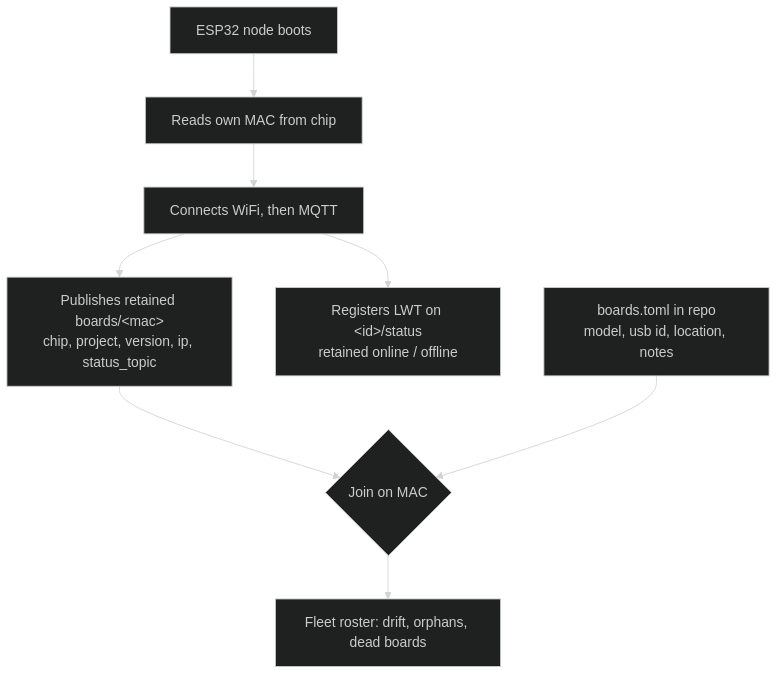
The split matters. The registry record describes hardware and firmware, so it carries no last-will — it should survive the node going offline. Liveness is a different topic with a retained online/offline last-will. Conflating those two gives you a fleet list that empties itself every time the WiFi hiccups.
Joining the two sources is where the value shows up: a board in the inventory but not the registry has not phoned home. A board in the registry but not the inventory is one I forgot to write down. Version drift across nodes running the same project shows up as a column.
One hard rule: the client ID must be unique per board. Two nodes sharing an MQTT client ID will take turns kicking each other off the broker, and the symptom — intermittent disconnects that correlate with nothing — will cost you a weekend.
A flash is not a release
I flash boards constantly. Almost none of it is a release.
A release, in my repo, means firmware that was successfully flashed and hash-verified, recorded as a signed git tag like coleus-one/v1.1.0.
The mechanics matter more than they sound:
- The version has exactly one home:
#define FW_VERSIONat the top of the sketch. The board prints it at boot and publishes it in its MQTT summary, and the release script derives the tag from it. One source of truth, visible three ways. - The script refuses to tag a dirty tree. If the working copy has uncommitted changes, the tag would not describe the bytes actually flashed, and a tag that lies is worse than no tag.
- It refuses to reuse an existing tag — that means you forgot to bump.
- It tags only if
esptoolreportsHash of data verified. A flash that did not verify is not a release; it is an attempt.
./release.sh --list              # what is attached, and which device is it
./release.sh coleus-one          # flash, verify, tag locally
./release.sh coleus-one --push   # and push commit + tag
Tags are GPG-signed. The point of all this ceremony is a question I can actually answer: what exactly is running on that board on the wall? Without it, the honest answer is “roughly the current source, probably, unless I flashed something at midnight.”
Sometimes the board is just dead
Back to that inventory entry.
An ESP32-S3 devkit. The chip responds. esptool connects, talks, and writes. Verify-flash passes — the bytes are on the flash. And then the image hash fails at boot, in every mode, at every speed. It will not execute what it demonstrably stored.
I spent real hours on it. Different cables, different modes, different speeds, an external FTDI adapter to bypass its flaky native USB. Eventually I wrote status = "dead" in the inventory, added a note explaining the symptom, and excluded it from port auto-detection so it would stop being offered as a target.
That is the part worth passing on. Cheap hardware fails, and it does not always fail cleanly. A five-dollar board can be alive enough to talk and too broken to boot, and no amount of firmware skill fixes silicon. Budget for spares. Keep the dead ones in the inventory, because an undocumented dead board gets plugged in again in six months and eats another afternoon.
Before you conclude the board is dead, though, exhaust the cheap causes in order — they are almost always the answer:
- The cable. An astonishing number of USB cables are charge-only. Try another one first, every time.
- Power. WiFi transmit draws current in bursts. An underpowered supply gives you brownout resets that look exactly like firmware crashes.
- A strapping pin you wired something onto (§5).
- Download mode — hold BOOT, tap RESET, release BOOT.
- Erase entirely —
esptool erase_flashclears corrupt partition state that a plain reflash leaves in place.
Where the ESP32 sits against the alternatives
- vs Arduino Uno / AVR — not close, unless you need 5V tolerance or absolute simplicity. The ESP32 is faster, has more memory, and has a radio. The Uno is 5V-native and utterly predictable, which occasionally is the requirement.
- vs ESP8266 — the 8266 is still fine for one-sensor WiFi nodes and still cheap. The ESP32 gives you more ADC channels, Bluetooth, more pins, and a second core. I run both without embarrassment.
- vs STM32 — the STM32 wins on peripheral depth, low-power precision, and industrial pedigree. It loses on integrated wireless and on how quickly you get to a working prototype.
- vs Raspberry Pi Pico W — genuinely competitive now, and the tooling is lovely. The ESP32 has a longer track record with WiFi and a deeper ecosystem of ready sensor libraries.
- vs a Raspberry Pi — different category. A Pi is a computer running Linux with all that implies, including an SD card that will eventually corrupt. An ESP32 boots in under a second, draws a fraction of the power, and can sit behind a wall for a year. For a sensor node, the microcontroller is usually the more reliable choice, not the compromise.
Where the ESP32 genuinely falls down: deep-sleep battery life is workable but never as good as parts designed for it, because the radio is expensive to wake. And the documentation is uneven — the datasheets are thorough, the middle layer is a patchwork of forum posts, and a meaningful fraction of tutorials are subtly wrong about pins.
What I would tell someone starting
Buy three boards, not one. You want a spare and a bench victim, and at these prices the third one costs less than an hour of debugging.
Get an S3 devkit unless you have a specific reason not to. It is the comfortable middle of the family.
Write the pin map at the top of the sketch on day one, before you have any reason to think you need it.
Learn millis() timing immediately, before you have written anything worth keeping. Retrofitting non-blocking structure onto a sketch built around delay() is a rewrite.
Put the credentials in a gitignored header from the very first commit. My sketches include a secrets.h defining SECRET_WIFI_SSID and friends, with a committed secrets.h.example as the template. Doing this later means rewriting history, and everyone who has had to do that remembers it.
And keep an inventory. Even at three boards. Especially the dead ones.
The ESP32 is not a perfect chip. Its ADC is mediocre, its documentation is patchy, and its sleep current is unremarkable. What it is, is a radio, a real processor, and enough memory to be comfortable, for the price of a coffee — and that combination has been quietly good enough to put a handful of them permanently in my walls.
Every hard-won thing in this guide came from a board that did not work, and most of them came from a board that almost worked. That is the actual curriculum. The datasheet tells you what the part does. The bench tells you what it does at three in the morning when the WiFi drops.
Write down what you learn. Especially the dead ones.